Blaze DC 3kW Dual Gun Charger Unboxing and Setup Guide

Shruti Menon
Associate Manager - Content
Published on:
17 Jul, 2026
Updated on:
05 Oct, 2026

Explore this content with AI:
Welcome to the Bolt.Earth Charging Network
Congratulations on choosing the Blaze DC 3kW Dual Gun. Whether you’ve installed it at your café, apartment, office, hotel, retail outlet, or commercial property, you’re now part of a growing EV charging ecosystem that’s making fast charging more accessible for electric two-wheeler riders across India.
Unlike a home charger designed for personal use, Blaze DC is built for businesses and property owners who want to offer reliable fast charging while creating a better experience for visitors, customers, employees, or residents.
Once your charger arrives, the next steps, from installation to activation, are straightforward, with guidance from the Bolt.Earth team.
This guide explains exactly what happens after delivery, so you know what to expect before your charger welcomes its first EV.
TL;DR
- Prepare installation site before delivery.
- Blaze DC delivery includes charger and documentation required for installation and activation.
- Certified installation team mounts, connects, and tests the charger.
- Dual gun diagnostics ensures both connectors work.
- Activation on Bolt.Earth network completes setup.
- Smart connectivity enables remote monitoring and software updates.
- The first charging session is performed after installation to verify everything is working as it should.
- Ongoing support available for post-installation.
Who Is Blaze DC Designed For?
Blaze DC is ideal for businesses that want to offer convenient EV charging for two-wheelers without investing in large, high-power infrastructure.
It works especially well in locations where electric two-wheelers spend 20–60 minutes parked, making it easy for riders to top up their batteries while they go about their day.
Before Your Blaze DC Arrives
A little preparation before delivery helps ensure installation is completed quickly and smoothly.
Site Readiness Checklist
Before delivery, make sure the following are ready:
Completing these checks beforehand helps ensure a smoother installation experience.
What Is Inside the Bolt.Earth Blaze DC Dual Gun 3kW Charger Box?
Watch the unboxing of Blaze DC Dual Gun (3kW) here:
Box Contents
- Blaze DC (3kW) Main Unit: Compact, sleek charging hub with LED display.
- Dual Charging Guns: Two premium, heavy-duty 2-meter cables with Type 6 and Type 7 connectors to support all major 2-wheeler EVs.
- Wiring Kit: A 10-meter single-phase input cable.
- Wall Mount Bracket: Secure vertical installation plate.
- Fastener Kit: Anchor bolts, screws, and wall plugs.
- Cable Hooks: Holsters for neat docking.
- User Manual: Wiring diagrams, safety guidelines, and mounting templates.
- Warranty Certificate: Official document validating your product coverage and support terms.
- CMS Activation Card: QR code and Device ID for onboarding your charger.

The exact contents may vary depending on the deployment configuration, but everything required for installation is verified before work begins.
Setting Up & Installing Your Blaze DC 3kW Dual Gun Charger
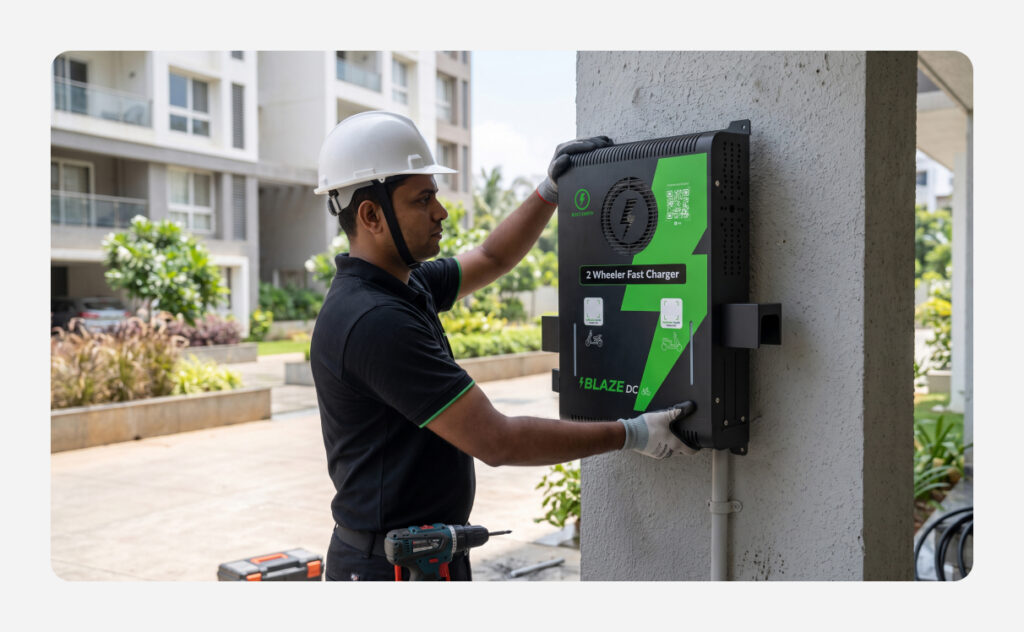
Once the charger is unboxed, it’s time to bring your charging station to life. Bolt.Earth provides certified professional installation to ensure safety, local compliance, and peak performance from day one.
While the technicians handle the heavy lifting, here is a detailed, behind-the-scenes look at the step-by-step process.
- Site Survey: Technicians verify your standard single-phase power supply, measure local 4G cellular or Wi-Fi signal strength, and ensure the wall structure is stable.
- Wall Mounting: The team aligns the heavy-gauge mounting plate using a laser level, drills into the concrete or brick, secures anchor bolts, and slides the Blaze DC unit into place.
- Main Line Integration: Technicians wire the 10-meter heavy-duty cable from your main distribution board directly into the charger’s internal terminal block, ensuring clean, hidden routing.
- Safety Checks: The team tests the circuit breakers and configures built-in grounding monitors to defend against overvoltage, short circuits, and earth faults.
- Boot-Up & Network Sync: Upon powering up, the unit’s dynamic LED status indicators light up. The technician configures the internal 4G SIM card or pairs it with your Wi-Fi network.
- Bolt.Earth CMS Registration: Using the unique QR code on your Activation Card, the team maps the charger directly to the Bolt.Earth Charging Management System (CMS).
- Live Onboarding: This step pairs your hardware to the cloud, letting you instantly set custom charging tariffs and making the station fully visible to local drivers on the public map.
- Dual-Gun Diagnostics: The team runs performance diagnostics on both the Type 6 and Type 7 guns individually to ensure independent 3kW power delivery is stable and safe.
- Admin Handover: The technician guides you through your live business dashboard on the app and completes the official handoff.
Features You’ll Love
Watch the Blaze DC Dual Gun (3kW) installation video.
Conclusion
That’s it; you’re all set. Once your Blaze DC is installed, activated, and commissioned, you’re ready to welcome EV riders with a fast, reliable charging experience backed by Bolt.Earth’s connected charging ecosystem.
Frequently Asked Questions
How long does it take to install and commission the Blaze DC?
If your site pre-checks are complete, the physical installation and digital commissioning take 2 to 3 hours. This includes mounting the heavy-gauge plate, routing the 10-meter single-phase cable, configuring the 4G/Wi-Fi network, and running diagnostic performance tests on each gun individually before handing over the system.
Can Blaze DC be installed both indoors and outdoors?
Yes. Blaze DC features an IP54-rated enclosure that makes it suitable for both indoor and outdoor installations. For the best performance, it should be installed at a location that meets the recommended electrical and safety requirements.
Can I change my charging tariff after the charger has been activated?
Yes. Once Blaze DC is connected to the Bolt.Earth Charging Management System (CMS), you can update your charging tariffs based on your business requirements, whether you choose to charge by time or electricity consumption.
How do I know if my charger is working properly?
You have two ways to monitor its health. Locally, you can check the charger’s dynamic LED status indicators, which change patterns to signal standby, active charging, or errors. Remotely, the cloud-based Bolt.Earth CMS platform tracks live telemetry 24/7 and will automatically alert you via the app if the hardware goes offline or encounters an electrical fault.

